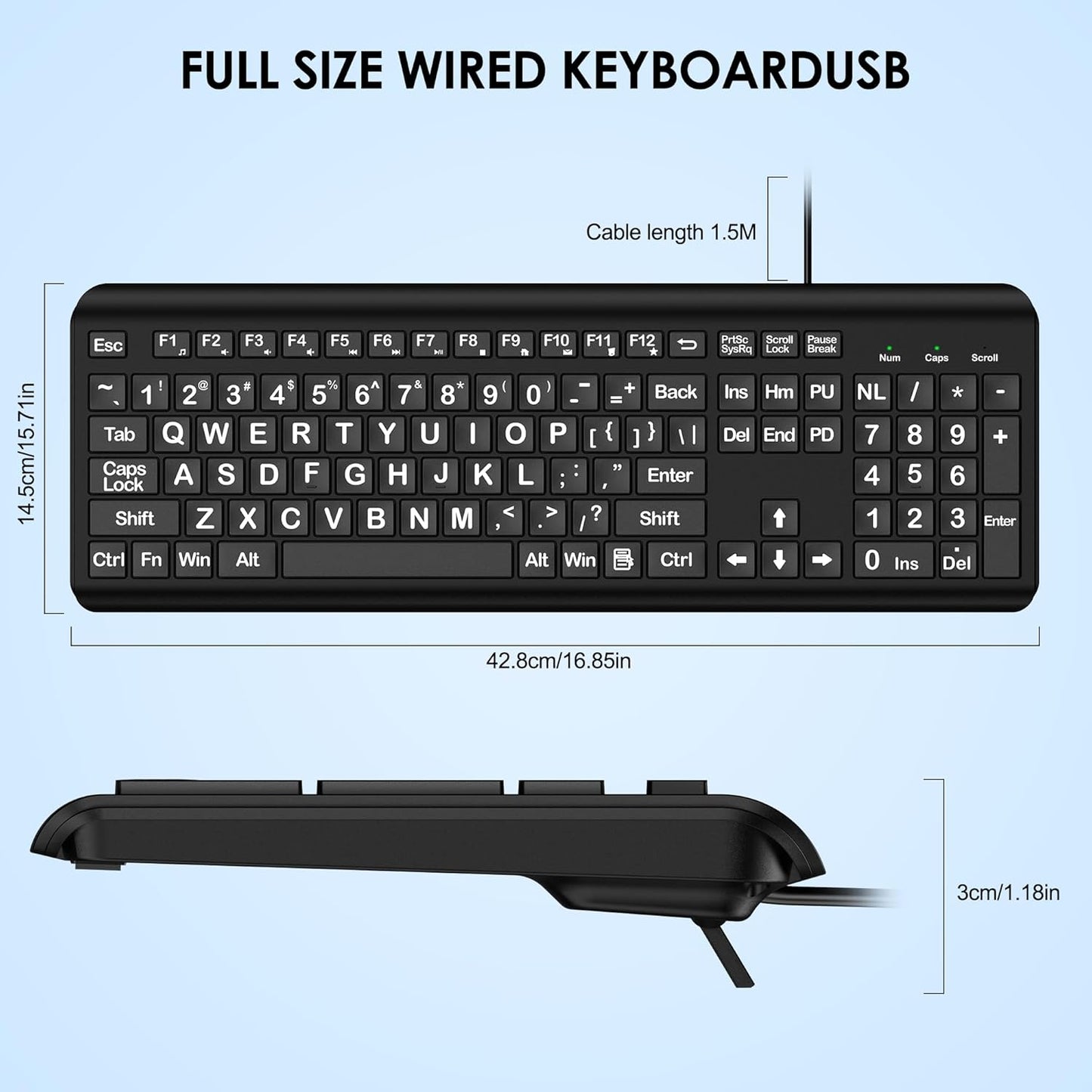
Large Print Wired Keyboard – 4X Oversized Letters for Visually Impaired, Seniors & Beginners
Large Print Wired Keyboard – 4X Oversized Letters for Visually Impaired, Seniors & Beginners
- Free Shipping
- 30-Day Returns
- Secure Checkout
No se pudo cargar la disponibilidad de retiro
Product Details
Product Details
Stop squinting. Stop reaching for glasses every time you need to find a key. Typing should be straightforward, not frustrating—and with text that's four times larger than standard keyboards, it finally can be. Whether you're regaining independence after vision changes, helping a parent stay connected, or just learning to type, this keyboard is designed to make every keystroke clear and confident.
This is a full-size wired USB keyboard engineered specifically for people with low vision or visual impairments. Every letter, number, and symbol is printed 4X larger than a standard keyboard, paired with high-contrast black text on white keys that's easy to read even in low light. It plugs directly into any PC or laptop—no drivers, no setup—and works immediately.
Perfect for: Seniors, people with visual impairments, beginners learning to type, schools, libraries, and anyone who's tired of squinting.
Key Benefits
- Reduces Typing Errors & Frustration — At 4X the size, letters are unmistakable. You'll hit the right key the first time instead of hunting around and second-guessing yourself.
- Stops Eye Strain & Squinting — Large print combined with high-contrast white keys and black lettering means you can see every character without leaning in or straining your eyes.
- Comfortable for Extended Typing — Ergonomic design with a foldable stand lets you position the keyboard at the angle that feels natural for your wrists and hands, reducing fatigue during long sessions.
- Stable & Won't Slip — Anti-slip rubber feet keep the keyboard firmly in place on your desk, so you can type with confidence without it shifting or moving.
- Works Right Out of the Box — Plug in the USB cable and start typing. No drivers to install, no software to configure. It's ready in seconds on Windows, Mac, Chromebooks, and most computers.
- Includes Convenient Shortcuts — 12 multimedia function keys give you quick access to volume control, music, and other functions without hunting through menus (some functions not available on Mac).
Product Features & Specs
| Feature | Specification |
|---|---|
| Print Size | 4X larger than standard keyboard fonts |
| Key Layout | Full-size (104 keys) with numeric keypad |
| Material | Durable plastic with high-contrast white keys / black lettering |
| Connection Type | Wired USB (plug-and-play, no drivers needed) |
| Ergonomic Features | Foldable stand for adjustable typing angle; anti-slip rubber feet |
| Indicators | Caps Lock and Number Lock LED indicators (upper right) |
| Multimedia Keys | 12 programmable shortcuts (music, volume, computer controls) |
| Compatible OS | Windows XP/Vista/7/8/8.1/10/11; Mac OS; Linux; Chromebook |
| Compatible Devices | Desktops, laptops, PCs, Chromebooks |
| Warranty | 12 months |
| Quiet Operation | Low-noise keys for comfortable typing in shared spaces |
How to Use
- Unpack and Inspect — Remove the keyboard from the box and check that all keys are intact and the USB cable is undamaged.
- Connect the USB Cable — Plug the USB connector into an available USB port on your computer or laptop. No adapters or additional hardware needed.
- Wait for Recognition — Most computers recognize the keyboard automatically within a few seconds. You may see a brief notification confirming the device is connected.
- Adjust the Foldable Stand — If desired, flip out the foldable stand on the back and adjust the typing angle to a comfortable position for your wrists.
- Start Typing — Begin typing immediately. Test a few keys to confirm all are responsive and working as expected.
Safety Tips:
- Keep the keyboard on a stable, flat surface to prevent accidental disconnection.
- Avoid spilling liquids on the keyboard. If spilled, unplug immediately and allow to dry completely before reconnecting.
- The wired connection is more stable than wireless, but avoid placing the cable where it could be tripped over.
- For best visibility, position the keyboard in good lighting or near a light source.
Who It's For
This keyboard is ideal for seniors experiencing age-related vision changes, anyone with low vision or visual impairment, individuals learning to type for the first time, caregivers setting up computers for family members, and institutions like schools and libraries serving populations with accessibility needs. It's also a thoughtful gift for aging parents or grandparents who want to stay connected online without frustration.
Why Choose This Over Alternatives
- True Full-Size Design — Many large-print keyboards shrink the overall layout to make room for bigger keys. This one keeps the standard full-size layout with numeric keypad, so you're not relearning key positions.
- Wired = Zero Lag, Reliable Connection — Wireless keyboards can drop connections or require battery replacements. USB wired means your typing is always responsive with no delays or interference.
- No Drivers = Instant Setup — Some keyboards require software installation. Plug this in and type—it works on any OS (Windows, Mac, Linux, Chromebook) without fuss.
- Ergonomic Comfort Included — Built-in foldable stand and anti-slip base address common pain points. You're not paying extra for a separate stand or risking a slippery keyboard.
- Affordable & Backed by Warranty — You get professional accessibility without the premium price tag of specialty keyboards, plus 12 months of protection.
Shipping & Returns
Shipping & Returns