Wired Keyboard Mouse Combo – Large Print Backlit with Ergonomic Wrist Rest & 6-DPI RGB Mouse
Wired Keyboard Mouse Combo – Large Print Backlit with Ergonomic Wrist Rest & 6-DPI RGB Mouse
- Free Shipping
- 30-Day Returns
- Secure Checkout
No se pudo cargar la disponibilidad de retiro
Product Details
Product Details
Your wrists hurt after just an hour at the keyboard. You can't find the mouse on your desk in low light. And every time you hunt for a key, you second-guess yourself. Typing shouldn't be this exhausting or frustrating—and it doesn't have to be. This keyboard-mouse combo is built for people who spend hours at their computer and need both visibility and comfort from the moment they sit down.
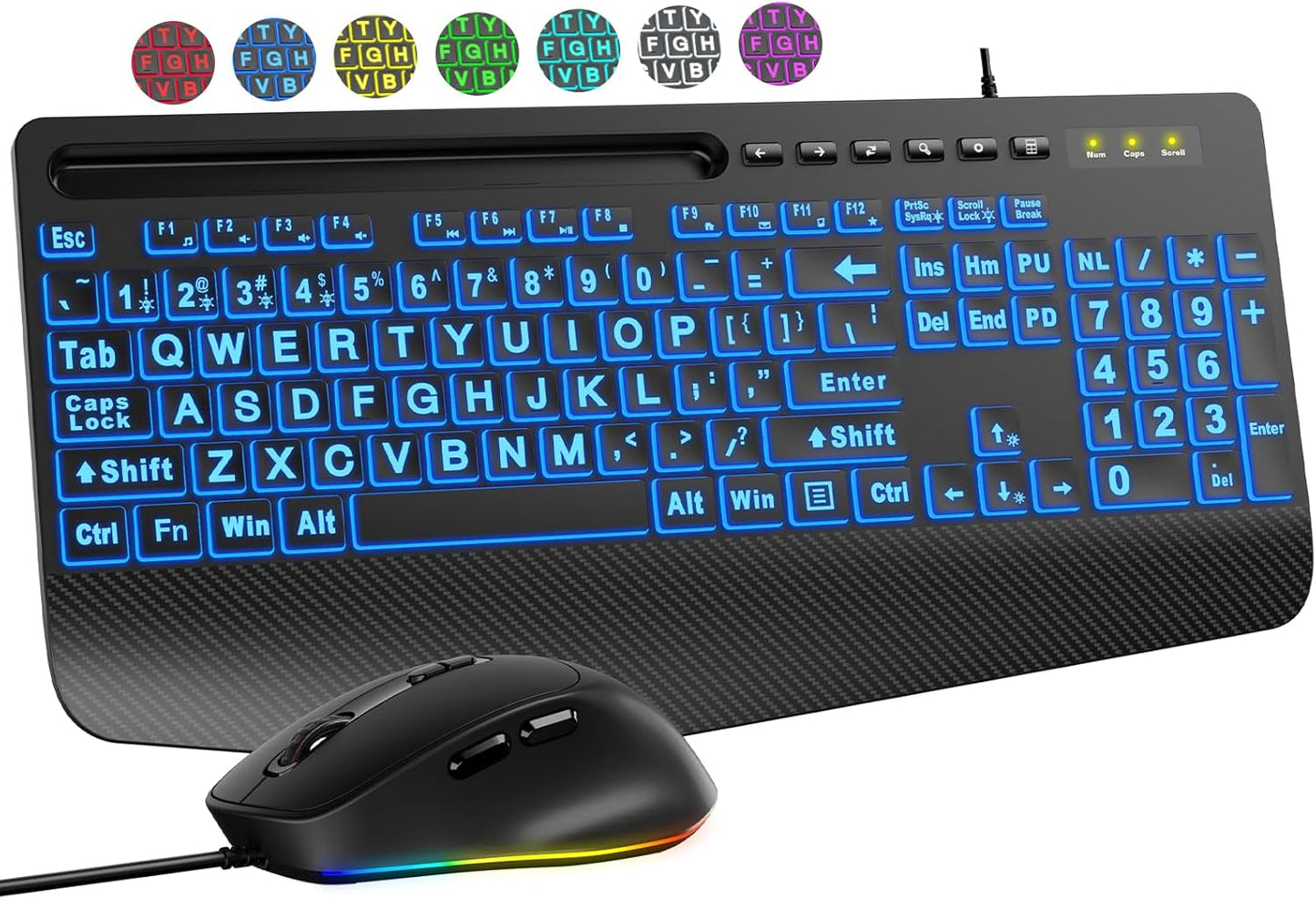
This is a complete wired keyboard-and-mouse solution designed for comfort and visibility. The keyboard features letters printed 4X larger than standard keys, paired with seven customizable backlight colors that illuminate every character—day or night. The matching ergonomic mouse lights up to match, eliminating the hunt-and-find game on a cluttered desk. An integrated palm rest and wrist support on the keyboard reduce the strain that builds up during long typing sessions. One USB cable plugs into your computer, and you're ready to work.
Perfect for: Seniors, students, office workers, anyone with low vision or visual impairments, people with repetitive strain concerns, and anyone who types for extended periods.
Key Benefits
- Eliminates Wrist & Hand Fatigue — The cushioned palm rest and ergonomic layout maintain neutral wrist positioning, reducing the strain that builds up during long typing sessions and helping prevent repetitive stress injuries. Type for hours without the sharp wrist pain that ends your workday early.
- See Every Key, Even in Dim Light — 4X larger text combined with seven customizable backlight colors means you'll never squint or miss a keystroke. The illuminated design lets you work in any lighting situation without eye strain.
- Spot Your Mouse Instantly — The matching backlit mouse means both input devices are visible at once. The consistent visibility across keyboard and mouse eliminates the frustration of hunting for a dark mouse on your desk.
- Customized Lighting for Your Vision — Choose from 7 bright colors and adjust brightness to match your lighting conditions and vision needs. Not everyone sees the same way—your backlight should adapt to you.
- Reduce Typing Errors & Clicks — Larger print and anti-slip mouse grip mean you hit the right key and click the right target the first time, saving time and frustration.
- Comfortable Grip for All Hand Sizes — Ergonomic mouse design with anti-slip base fits naturally in your hand, reducing accidental clicks and hand fatigue whether you're left- or right-handed.
- Instant Setup, Zero Hassle — Plug the USB cable in and start typing. No drivers to install, no software to configure, no charging required. It works immediately on Windows, PCs, laptops, and Chromebooks.
- Six Precision DPI Settings — Adjust cursor speed (800/1200/1600/2400/3200/3600) to match your preferences. Sensitive touch? Dial it down. Need speed? Turn it up.
Product Features & Specs
| Feature | Specification |
|---|---|
| Print Size | 4X larger than standard keyboard fonts |
| Key Layout | Full-size (104+ keys) with numeric keypad, multimedia shortcuts |
| Backlight Colors | 7 selectable colors with adjustable brightness |
| Backlight Modes | 4 modes (on/off, brightness adjustment) |
| Ergonomic Features | Integrated palm rest, wrist support, bottom support platform |
| Mouse Features | Ergonomic grip, 6 DPI settings, anti-slip base, forward/back buttons |
| Mouse Backlight | 7 color modes matching keyboard |
| Connection Type | Wired USB (plug-and-play, no drivers needed) |
| Cable Length | 5.2 feet (sufficient for most desk setups) |
| Compatible OS | Windows 10/11, PC, Laptop, Chromebook (Note: Multimedia keys not fully compatible with macOS) |
| Quiet Operation | Low-noise keys for shared workspaces |
| Physical Design | Phone/tablet holder included |
Important Note: Backlight does not retain memory settings after power cycle—you may need to reset your preferred color/mode when restarting.
How to Use
Initial Setup:
- Unpack the Combo — Remove keyboard, mouse, USB cable, and any accessories from the box. Inspect for damage in transit.
- Position Your Workspace — Place the keyboard at a comfortable distance where your elbows are at 90 degrees and wrists are neutral (not bent up or down). Position the mouse to the side of the keyboard, within easy reach.
- Connect the USB Cable — Plug the 5.2-foot USB cable into an available USB port on your computer. Both keyboard and mouse will be recognized simultaneously.
- Adjust the Backlight — Press the backlight control buttons to select your preferred color and brightness level. Test different settings under your normal lighting conditions.
- Customize DPI Settings — Press the DPI button on the mouse to test different cursor speed settings. Start at 1200 DPI if unsure; adjust up or down based on your comfort.
- Use the Palm Rest — Position your wrists on the integrated palm rest while typing. Maintain a neutral wrist position—not bent forward or backward.
- Start Typing & Clicking — Begin typing immediately. Test the mouse buttons, back/forward navigation buttons, and scroll wheel to confirm proper function.
Daily Tips for Comfort:
- Take a 5-10 minute break every hour, even if you feel fine. Prevention is easier than recovery.
- Keep your desk at elbow height—your forearms should be parallel to the ground when typing.
- Position your screen at eye level, about 20-26 inches away, to reduce neck strain.
- Use the phone holder to keep your mobile device at eye level, avoiding neck strain from looking down.
- If backlight dims after 120 seconds of inactivity, press a key or move the mouse to reactivate.
Who It's For
This combo is ideal for seniors experiencing age-related vision changes or anyone with low vision, students studying or writing papers for extended hours, office workers managing email and spreadsheets all day, people recovering from carpal tunnel or repetitive strain injuries, anyone who types in dim lighting or shared workspaces, and professionals who need both ergonomic support and accessibility. It's also an excellent gift for parents, grandparents, or colleagues who complain about wrist pain or eye strain at the computer.
Why Choose This Over Alternatives
- Complete Solution in One Package — Buy a keyboard-only and you'll hunt for a compatible mouse later. This combo arrives matched, tested, and ready to use—no hunting, no compatibility guessing.
- Wired Reliability — Wireless combos need batteries, can drop connections, and may have latency. Wired alternatives avoid the cost and complexity of batteries while providing responsive, zero-lag typing and clicking.
- Integrated Wrist Support — Many combos require you to buy a separate wrist rest. This includes built-in palm and wrist support, so your comfort starts immediately without extra purchases.
- Customizable Backlight — Generic backlit keyboards use one color. This combo offers seven colors you can customize to your vision needs and lighting environment—accessibility that adapts to you, not the other way around.
- Full-Size Layout with Numeric Pad — Compact keyboards save space but force awkward hand positions. This keeps the standard full-size layout so you're not relearning where numbers are or reaching awkwardly.
- Phone Holder Built In — Reduces neck strain from looking down at your phone. A small feature that matters for posture during long work sessions.
- 6 DPI Settings on Mouse — More precision levels than budget alternatives means you can dial in the exact cursor sensitivity that matches your working style.
Shipping & Returns
Shipping & Returns